Customer Segments v25.9+
Customer Segments in Maho enable you to create dynamic groups of customers based on powerful, real-time conditions. Target specific customer behaviors, demographics, purchase patterns, and engagement metrics to deliver personalized experiences, targeted promotions, and automated marketing campaigns.
Overview
Customer segmentation is a fundamental feature for data-driven marketing and personalization:
- Dynamic targeting: Automatically match customers based on real-time conditions
- Rich condition types: 13+ condition categories covering customer data, orders, cart, and behavior
- Sales rule integration: Use segments for targeted pricing and promotions
- Email automation: Trigger automated email sequences (see Email Automation)
- Website-aware: Scope segments to specific websites
- Performance optimized: Efficient SQL queries with smart caching
Key Benefits
For Marketing Teams
- Precision targeting: Reach the right customers with the right message
- Behavioral triggers: React to customer actions in real-time
- Campaign performance: Measure segment-specific conversion rates
- Reduced waste: Stop broadcasting, start targeting
For E-commerce Managers
- Personalized pricing: Offer segment-specific discounts and promotions
- Inventory management: Target promotions to move slow-moving stock
- Customer retention: Identify at-risk customers before they churn
- Lifetime value optimization: Focus on high-value customer segments
For Business Owners
- Revenue growth: Increase conversion through personalization
- Customer insights: Understand your customer base through segmentation
- Operational efficiency: Automate targeting and promotions
- Competitive advantage: Deliver enterprise-level personalization
Segment Conditions
Maho provides 13 powerful condition types to create sophisticated customer segments:
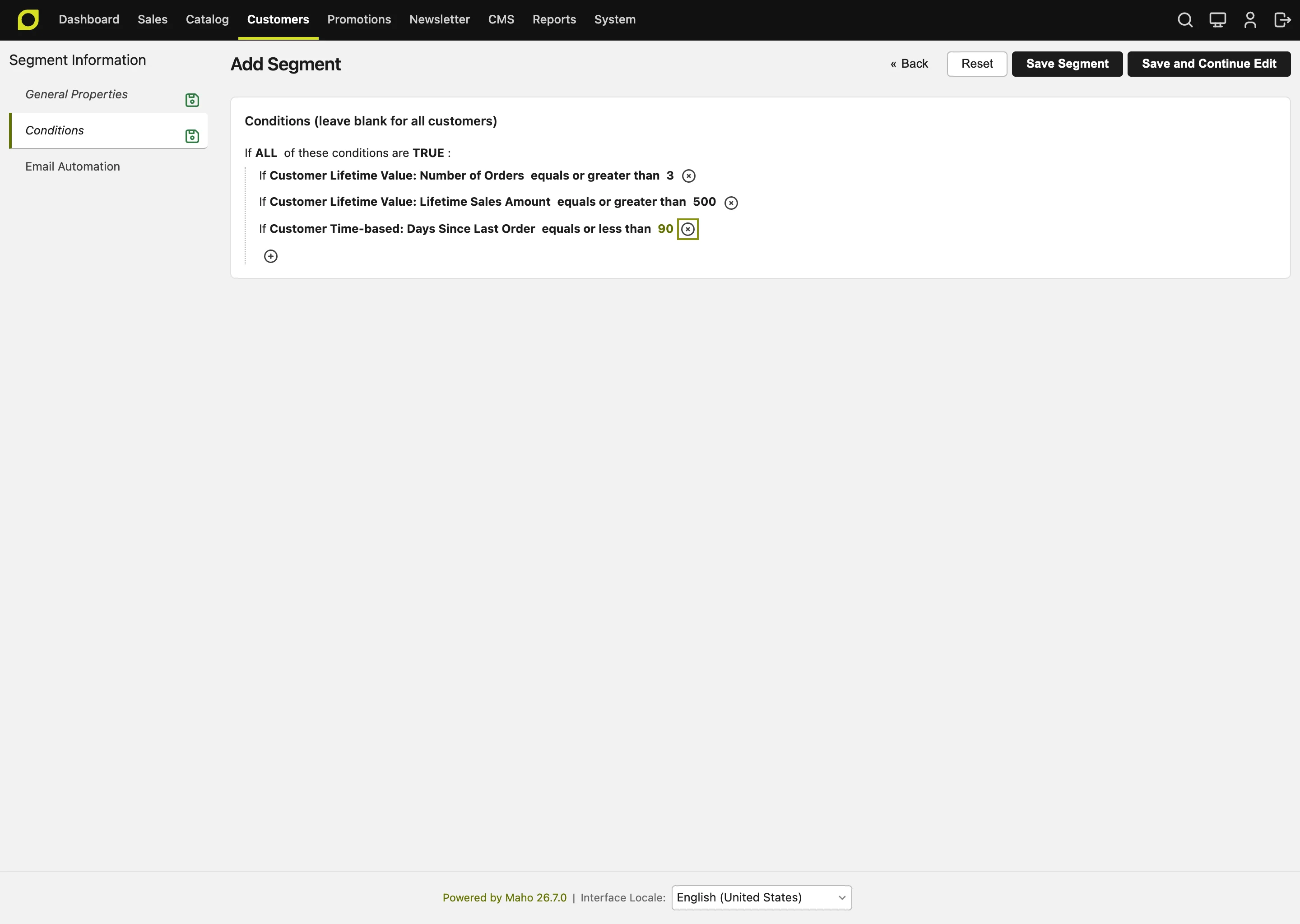
1. Customer Personal Information
Target customers by their profile data:
| Attribute | Type | Example Use Case |
|---|---|---|
| Text | VIP customer list by domain (@company.com) | |
| First Name | Text | Personalization testing |
| Last Name | Text | Family account grouping |
| Gender | Select | Gender-specific product promotions |
| Date of Birth | Date | Age-based targeting |
| Customer Since | Date | Loyalty program tiers by tenure |
| Customer Group | Multi-select | Wholesale vs. Retail pricing |
| Account Created In Store | Multi-select | Store-specific campaigns |
| Days Since Registration | Numeric | New customer onboarding (< 30 days) |
| Days Until Birthday | Numeric | Birthday promotions (0-7 days) |
Example: Birthday Campaign
2. Customer Address
Segment by billing or shipping address:
| Attribute | Example |
|---|---|
| Country | International shipping promotion |
| State/Province | Region-specific offers |
| City | Local store pickup campaigns |
| Postal Code | ZIP code targeting |
| Street Address | (Rarely used) |
Example: Free Shipping to California
3. Customer Lifetime Value (CLV)
Identify high-value and VIP customers:
| Metric | Use Case |
|---|---|
| Lifetime Sales Amount | VIP program qualification ($1000+) |
| Number of Orders | Repeat customer identification (>3) |
| Average Order Value | Premium customer targeting ($200+ AOV) |
| Lifetime Profit | True profitability segmentation |
| Lifetime Refunds | Problem customer identification |
Example: VIP Customer Segment
Conditions:
- Lifetime Sales Amount: greater than $1000
- Number of Orders: greater than 5
- Lifetime Refunds: less than $100
4. Newsletter Subscription
Target by subscription status:
| Status | Use Case |
|---|---|
| Subscribed | Email marketing campaigns |
| Unsubscribed | Re-engagement offers (non-email) |
| Not Subscribed | Subscription drive promotions |
Example: Subscription Drive
5. Shopping Cart Attributes
Target customers based on their active cart:
| Attribute | Type | Example |
|---|---|---|
| Cart Status | Select | Active vs. Inactive |
| Cart Items Count | Numeric | Multi-item discount |
| Cart Subtotal | Numeric | High-value cart incentive |
| Cart Grand Total | Numeric | Threshold-based shipping |
| Cart Tax Amount | Numeric | Tax analysis |
| Cart Discount Amount | Numeric | Discount usage tracking |
| Cart Updated Date | Date | Abandonment timeframe |
| Days Since Cart Update | Numeric | Cart abandonment (>1 hour) |
Example: High-Value Cart Abandonment
Conditions:
- Cart Status: equals Active
- Cart Grand Total: greater than $200
- Days Since Cart Update: greater than 0.04 (1 hour)
6. Shopping Cart Items
Target based on specific products in cart:
| Condition | Use Case |
|---|---|
| Product SKU | Specific product targeting |
| Product Name | Product line promotions |
| Category | Category-level incentives |
| Price | Price range filtering |
| Quantity | Bulk purchase detection |
Example: Complete the Set
Conditions:
- Cart Items: Category equals "Cameras"
- Cart Items: SKU does not contain "memory-card"
7. Order Information
Segment by historical order data:
| Attribute | Type | Example |
|---|---|---|
| Total Items Quantity | Numeric | Bulk buyers |
| Total Amount | Numeric | High-value order threshold |
| Subtotal | Numeric | Pre-tax/shipping amount |
| Tax Amount | Numeric | Geographic tax analysis |
| Shipping Amount | Numeric | Shipping cost sensitivity |
| Discount Amount | Numeric | Coupon usage patterns |
| Grand Total | Numeric | Complete order value |
| Order Status | Select | Completed, Pending, Canceled |
| Purchase Date | Date | Seasonal purchase patterns |
| Last Modified | Date | Recently updated orders |
| Store | Select | Multi-store targeting |
| Currency | Select | International customers |
| Payment Method | Select | Payment preference targeting |
| Shipping Method | Select | Delivery preference analysis |
| Coupon Code | Text | Specific promotion tracking |
| Days Since Last Order | Numeric | Win-back campaigns (>90 days) |
| Average Order Amount | Numeric | Average spend analysis |
| Total Ordered Amount | Numeric | Cumulative order value |
Example: Inactive Customer Win-back
Conditions:
- Days Since Last Order: greater than 90
- Number of Orders: greater than 1
- Newsletter: Subscribed
8. Order Items
Target based on previously purchased products:
| Condition | Use Case |
|---|---|
| Product SKU | Replenishment campaigns |
| Product Name | Product line cross-sell |
| Category | Category affinity targeting |
| Price | Price sensitivity analysis |
| Quantity | Bulk buyer identification |
Example: Replenishment Campaign
Prompt: Time to reorder your favorite coffee!9. Product Viewed
Target customers who viewed specific products:
| Condition | Use Case |
|---|---|
| Product | Browse abandonment recovery |
| Viewed Date | Recent interest targeting |
| View Count | High-intent browsers |
Example: Browse Abandonment
Conditions:
- Product Viewed: Category equals "Laptops"
- Product Viewed: Viewed Date was in last 7 days
- Number of Orders: equals 0 (no purchase yet)
10. Product in Wishlist
Target based on wishlist activity:
| Condition | Use Case |
|---|---|
| Product | Wishlist reminder campaigns |
| Added Date | Aged wishlist items |
| Wishlist Name | (If using named wishlists) |
Example: Wishlist Reminder
Prompt: Still dreaming about these items? Here's 10% off!11. Combine Conditions
Use logical operators to create complex segments:
- ALL (AND): All conditions must be true
- ANY (OR): At least one condition must be true
- NOT ALL: At least one condition must be false
Example: High-Value Abandoned Cart OR Long-Time Inactive
Combine: ANY of the following
  Sub-group 1 (ALL):
    - Cart Status: Active
    - Cart Grand Total: > $200
    - Days Since Cart Update: > 1 day

  Sub-group 2 (ALL):
    - Days Since Last Order: > 180
    - Lifetime Sales: > $500
Practical Examples
Example 1: VIP Customer Tier
Goal: Identify top-spending customers for exclusive benefits
Segment Configuration:
Name: VIP Platinum Tier
Conditions (ALL):
- Lifetime Sales Amount: greater than $5000
- Number of Orders: greater than 10
- Average Order Value: greater than $200
- Lifetime Refunds: less than 5% of Lifetime Sales
Website: All Websites
Active: Yes
Use Cases: - Exclusive product access - VIP pricing tiers (via sales rules) - Dedicated customer service - Invitation-only events
Example 2: Cart Abandonment - High Value
Goal: Recover high-value abandoned carts
Segment Configuration:
Name: Cart Abandoned $200+
Conditions (ALL):
- Shopping Cart: Status equals "Active"
- Shopping Cart: Grand Total greater than $200
- Shopping Cart: Days Since Update greater than 0.04 (1 hour)
- Newsletter: Subscription Status equals "Subscribed"
Website: All Websites
Auto Email: Enabled (Enter Segment)
Active: Yes
Email Sequence: 1. 1 hour: Gentle reminder 2. 24 hours: 10% discount coupon 3. 7 days: 15% + free shipping
Expected ROI: 20-25% recovery rate
Example 3: New Customer Welcome
Goal: Nurture first-time customers
Segment Configuration:
Name: New Customers - No Orders
Conditions (ALL):
- Customer: Days Since Registration less than 30
- Customer: Number of Orders equals 0
- Newsletter: Subscribed
Website: All Websites
Auto Email: Enabled (Enter Segment)
Active: Yes
Email Sequence: 1. Immediate: Welcome + 15% off first order 2. 3 days: Product guide & bestsellers 3. 7 days: Customer testimonials 4. 14 days: Last chance offer
Example 4: Win-back Inactive Customers
Goal: Re-engage customers who haven't ordered in 6 months
Segment Configuration:
Name: Inactive 180+ Days
Conditions (ALL):
- Order: Days Since Last Order greater than 180
- Order: Total Orders greater than 1
- Newsletter: Subscribed
- Lifetime Sales: greater than $100
Website: All Websites
Auto Email: Enabled (Enter Segment)
Active: Yes
Strategy: - Email sequence with progressive discounts - Showcase new products since last visit - "We miss you" personalization
Example 5: Birthday Campaign
Goal: Send birthday offers to customers
Segment Configuration:
Name: Today's Birthdays
Conditions (ALL):
- Customer: Days Until Birthday equals 0
- Newsletter: Subscribed
Website: All Websites
Auto Email: Enabled (Enter Segment)
Refresh Mode: Auto (Daily refresh)
Active: Yes
Email: - Birthday greeting - 20% birthday discount coupon (30-day expiration) - Free shipping
Example 6: Category Affinity - Cross-sell
Goal: Target customers who bought from one category with related products
Segment Configuration:
Name: Camera Buyers - No Accessories
Conditions (ALL):
- Order Items: Category equals "Cameras"
- Order: Purchase Date was in last 90 days
- Order Items: Category does not equal "Camera Accessories"
Website: All Websites
Active: Yes
Sales Rule: 15% off camera accessories
Example 7: Geographic Expansion
Goal: Target new shipping regions
Segment Configuration:
Name: UK Customers - New Region
Conditions (ALL):
- Shipping Address: Country equals "United Kingdom"
- Customer: Created At after 2026-01-01
Website: UK Website
Auto Email: Enabled (Enter Segment)
Active: Yes
Welcome Sequence: 1. Welcome to UK store 2. Free shipping on first order 3. Local customer success stories
Example 8: Repeat Purchase Cycle
Goal: Trigger replenishment for consumable products
Segment Configuration:
Name: Coffee Replenishment Due
Conditions (ALL):
- Order Items: Category equals "Coffee"
- Order: Purchase Date was 28-35 days ago
- Newsletter: Subscribed
Website: All Websites
Auto Email: Enabled (Enter Segment)
Active: Yes
Email: "Time to restock your coffee!"
Example 9: High-Intent Browsers
Goal: Convert browsers who viewed expensive items
Segment Configuration:
Name: High-Value Browsers - No Purchase
Conditions (ALL):
- Product Viewed: Price greater than $500
- Product Viewed: Viewed in last 7 days
- Number of Orders: equals 0
- Newsletter: Subscribed
Website: All Websites
Active: Yes
Strategy: Personal consultation offer, financing options
Example 10: Loyalty Tier Advancement
Goal: Motivate customers close to next loyalty tier
Segment Configuration:
Name: $50 Away from Gold Tier
Conditions (ALL):
- Lifetime Sales: greater than $950
- Lifetime Sales: less than $1000
- Days Since Last Order: less than 60
Website: All Websites
Auto Email: Enabled (Enter Segment)
Active: Yes
Email: "Just $50 away from Gold status! Here's what you'll unlock..."
Configuration
Creating a Segment
- Navigate to Customers → Customer Segments
- Click "Add Segment"
- Configure basic settings:
- Name: Descriptive segment name
- Description: Internal notes
- Status: Active/Inactive
- Websites: Scope segment to specific websites
-
Refresh Mode: Auto (scheduled) or Manual
-
Build conditions in the "Conditions" tab:
- Click "+" to add conditions
- Choose condition type from dropdown
- Configure operator and value
-
Nest conditions using Combine for complex logic
-
Optional: Configure email automation:
- Enable "Auto Email Active"
- Choose trigger: Enter or Exit segment
-
Configure email sequence (see Email Automation)
-
Save the segment
Refreshing Segments
Segments can be refreshed manually or automatically:
Manual Refresh: - Click Refresh in the Action column of the segment grid - The refresh runs in the background, through the message queue. The status of the segment changes to "Pending" - When the refresh is complete, you get a message in System > Notifications with the number of customers in the segment. The newest message also shows in the bar at the top of the next admin page that you open. If the refresh fails, the message has the error. When the cause is not in the data, for example a lost database connection, the queue tries again - If you click Refresh again while the refresh waits, Maho does not add a second refresh. If you click while the refresh is in progress, Maho adds one more refresh after it, because the refresh read the customers when it started
Automatic Refresh: - Set "Refresh Mode" to "Auto" - Runs daily via cron at 5 AM (default) - Configure schedule in customer/customer_segments/cron_schedule
Refresh Status: - Pending: Waiting to be refreshed - Processing: Currently refreshing - Completed: Successfully refreshed - Error: Refresh failed (check logs)
Using Segments in Sales Rules
- Navigate to Promotions → Shopping Cart Price Rules
- Create or edit a price rule
- In Conditions tab, add condition:
- Customer Segment → Matches: Select your segment(s)
- Configure discount and other rule details
- Save the rule
Example: VIP-Only 20% Discount
Name: VIP Platinum - 20% Off
Conditions:
- Customer Segment: matches "VIP Platinum Tier"
Actions:
- Apply: 20% discount on entire cart
- Free Shipping: Yes
Performance & Optimization
Segment Refresh Performance
Large segments can take time to refresh:
- Small (< 1,000 customers): < 1 second
- Medium (1,000-10,000): 1-5 seconds
- Large (10,000-100,000): 5-30 seconds
- Very Large (100,000+): 30 seconds - 2 minutes
Optimization Tips: - Use indexed fields when possible (customer_id, email, created_at) - Avoid overly complex nested conditions - Refresh during off-peak hours - Consider manual refresh for rarely-used segments
Monitoring & Analytics
Segment Metrics
Each segment displays key metrics:
- Matched Customers: Current segment size
- Last Refresh: When segment was last updated
- Refresh Status: Current processing status
- Created At: Segment creation date
- Priority: For overlapping segment resolution
Viewing Segment Members
To see which customers are in a segment:
- Option A - Admin Grid:
- Customer grid → Filter by segment
-
Shows all customers in selected segment
-
Option B - Export:
- Use Maho export functionality
- Filter by segment before export
Performance Monitoring
Monitor segment refresh performance in logs:
Location: var/log/customer_segmentation.log
2026-07-10 05:00:00 INFO: Refreshing segment: VIP Platinum (ID: 1)
2026-07-10 05:00:02 INFO: Segment 1 refreshed successfully. Time: 1.82s, Memory: 12.5MB, Customers: 342
Best Practices
1. Segment Design
Do: - Use descriptive names ("Cart Abandoned $200+" vs "Segment 1") - Add detailed descriptions for team reference - Test conditions on a few customers first - Start simple, add complexity as needed
Don't: - Create overlapping segments unless intentional - Use overly broad conditions (entire customer base) - Neglect to document segment purpose
2. Refresh Strategy
For Real-Time Needs: - Use manual refresh mode - Trigger via API or admin action - Best for time-sensitive campaigns
For Scheduled Campaigns: - Use auto refresh mode - Leverage daily cron job - Best for ongoing automation
3. Condition Building
Efficient Conditions: - Use indexed fields (email, customer_id, dates) - Avoid string pattern matching on large datasets - Combine related conditions logically
Inefficient Conditions: - LIKE '%pattern%' on large text fields - Overly nested combine conditions (>3 levels) - Cartesian product conditions
4. Email Automation Integration
When to Automate: - Transactional sequences (cart abandonment, welcome) - Time-sensitive offers (birthday, win-back) - Behavioral triggers (browse abandonment)
When to Manual Send: - One-time campaigns - A/B testing templates - Unproven segment performance
5. Sales Rule Usage
Combine Segments with Other Conditions:
Conditions (ALL):
- Customer Segment: matches "VIP Tier"
- Cart Subtotal: greater than $100
- Shipping Country: equals "US"
Use Priority for Overlapping Rules: - Higher priority segments get precedence - Prevent discount stacking issues
Troubleshooting
Segment Not Matching Expected Customers
Check: 1. ✅ All conditions are configured correctly 2. ✅ Operators match intent (equals vs. greater than) 3. ✅ Segment has been refreshed recently 4. ✅ Website scope is correct 5. ✅ Test with a specific customer ID manually
Segment Refresh Failing
Common Causes: - Invalid SQL in complex conditions - Missing required data (deleted products, etc.) - Database connection issues - Memory limit exceeded for very large segments
Check Logs:
Performance Issues
Symptoms: - Segment refresh takes >5 minutes - Admin panel slow when viewing segments - Cron jobs timing out
Solutions: 1. Add database indexes (see the Developer Guide for recommended indexes) 2. Simplify conditions (reduce nesting) 3. Increase PHP memory (php.ini: memory_limit = 512M) 4. Run refresh manually during off-peak hours
For developers
Working with segments in code - programmatic membership checks, real-time evaluation, custom condition types, observers, or the underlying database schema - is covered in the Customer Segments Developer Guide.
Migration from Other Platforms
From Magento 1 Enterprise
Maho's segmentation is based on (and compatible with) Magento 1 Enterprise Edition:
- Conditions: Nearly identical condition types
- Database schema: Compatible structure
- Export/Import: Can migrate segment configurations
- Enhancements: Email automation is new in Maho
Migration Steps: 1. Export segment conditions from M1EE 2. Recreate segments in Maho admin 3. Test conditions with sample customers 4. Enable and configure email automation (new feature)
From Magento 2
Magento 2 has similar segmentation:
- Concept mapping: M2 segments → Maho segments
- Conditions: Similar but syntax differs
- Rebuild required: Manual recreation needed
- Test thoroughly: Condition logic may differ